I would like to ask some questions regarding RMP with INtime nodes pertaining to the single-core & multi-core licenses in INtime (apologies as my understanding is limited on this)
As per my understanding, an INtime multi-core license enables you to create multiple nodes to assign a core to each node:
You can then deploy/assign tasks to multiple nodes which allocates a processor core for that specific process
Eg. If I have 40 axes and would like to spread resources between them evenly:
Would it be possible for RMP to be segmented into multiple INtime nodes instead of just NodeA in a multi-core license?
that way we would be able to utilize more cores to perform RMP tasks for the axes to improve performance instead of only using one core in NodeA
Like 10 axes running on NodeA, 10 axes running on NodeB and so on…
or
We would have to acquire 4 different RSI Licenses (10 axes each) + 4 USBs to achieve this?
Then each USB RSI instance would have to occupy NodeA, NodeB, NodeC and NodeD
I’m not sure if this would work or not as you would then have to plug in 4 different USB dongles
**If this is possible, can it be done with RapidCode and/or INtime SDK
tl;dr Would it be possible to assign RMP to run on more than 1 core?
RMP (The Motion Controller) works within a single core and has a single RMPNetwork (EtherCAT network) associated with it. You can’t currently split the RMP over different cores.
You could run multiple RMP instances on different INtime cores. Each would have its own RMPNetwork and associated NIC for communicating with the network. This wouldn’t include any coordination between the groups unless you did the lifting at the application layer (a possibility).
So you would have
1 Intime Multicore license/usb
4 isolated Cores, RMPs, RMPNetworks, & Nics.
Is this an effort to save on PC cost or is there another goal in mind?
I see, thank you for the clarification on this. And thank you for the advice/suggestion on running multiple RMP instances. As for coordination between the groups, this might require interprocess communication between the nodes?
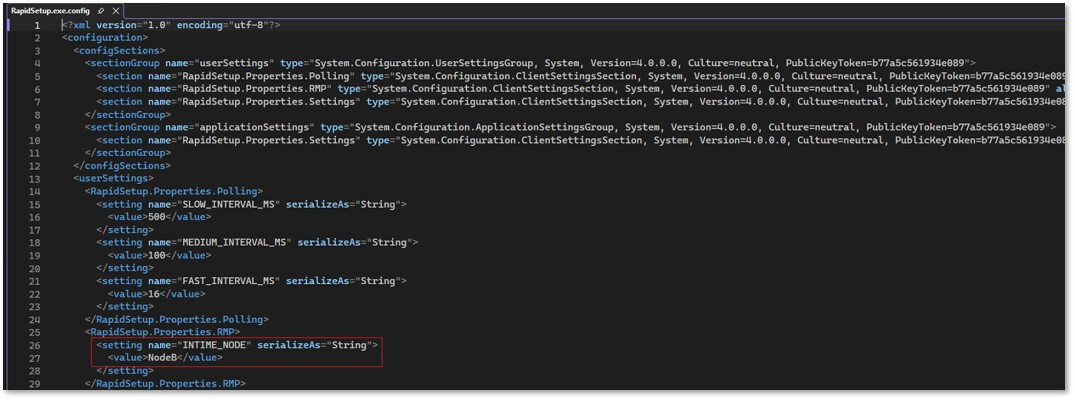
And for generating ENI files for the RMP instances, how does RapidSetup know which instance we are setting up for, does that mean there will be multiple ENI files?
We would like to try to mitigate some slight performance issues as there has been fluctuations and slight delays in the cycle time and also spikes in the firmware time (%) - controller.ProcessorUsageGet()
As lately the inconsistency and delays in the cycle time (up to 200ms) is becoming frequent and the firmware time (%) will sometimes spike up to high numbers ( > 100%), hitting the max CPU usage.
Your help and feedback is much appreciated, thank you!
I would use RapidSetupX over RapidSetup as it lets you specify the Intime Node Name (e.g. NodeA, NodeB etc). You would have unique ENI files for each of the 4 networks. Each would be working out of their own separate folders.
I would investigate the computer you are running on if you want to improve performance. We spend a lot of time researching the industrial pcs we sell to ensure they are reliable. Trying to split out the processes is likely going to cost more engineering time than you’d save on specing/testing a pc that can hit your performance goals. I don’t think setting up a coordinated multi-node/network setup is going to easy. We’ve tested it out, but don’t have anyone currently doing something like this. In practice, I think its better to address the spikes at the hardware level.
What PC are you using? Do you have a TPAT jitter report for it? What is your axis count and sample rate. You can improve performance on any given PC a lot with proper tuning. I’d start with here.
Just wanted to clarify on whether the following method is correct for creating multiple RMPNetwork instances:
This is for using a single PC to control multiple RMPNetworks where each network does not have interprocess communication between them
Main reason for this is to run separate modules (which each have their own axes) on different RMPNetworks so if one module/RMPNetwork goes down, the others will still be running fine unlike if all of them are grouped in one network, all the other axes stop running when the entire RMPNetwork shuts down if one node fails
Test setup and configuration
1x Multi-core INtime dongle
1x IPC with multiple NICs
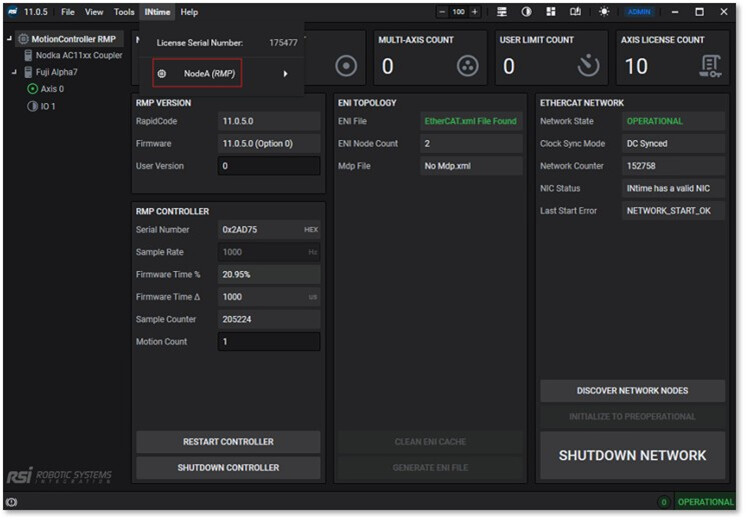
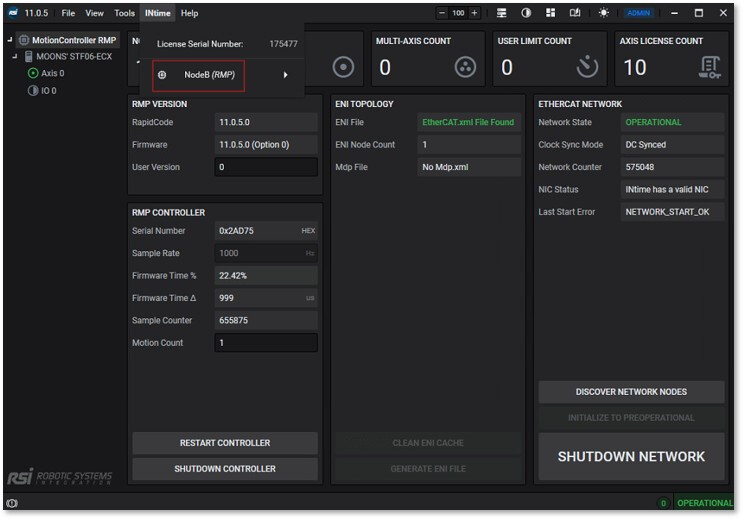
2x INtime nodes
2x RSI Installation paths (C:\RSI\X.X.X\ folders) – Both have same rsi.lic
2x RMP networks (RapidSetup) and RMP controller instances
A NodeB is created with the same configuration as NodeA (512mb, 50us kernel clock rate etc.) but passed with different NICs.
There are 2 RSI installation folders which represent the multiple controller instances.
Yes, I believe this will let two different processes like RapidSetup/X to work at the same time. Unfortunately, I don’t think this will work currently for a single process/application instance as RapidCode creation methods are going to return the first MotionController created each time. The current RapidCode singleton returns the first created controller, so creating NodeA then NodeB in the same process does not create two independent controllers.
We are currently approaching a solution for this in two directions. Working along the lines of this post, we are testing with a branch which has enhanced MotionController creation and attachment logic. This would allow your application to create MotionControllerA and MotionControllerB with respective nodes and networks. You wouldn’t be able to have any MultiAxis objects between them though.
We are also working towards SyncUnits and other features which allow Nodes to fall into error or completely disappear while allowing the rest of the network to continue in operation as long as possible. This seems like the better solution to lower application development costs, but is going to take longer to get right. We have to make sure the diagnostics, recovery, and tools are available to protect a partially functioning machine and anyone operating it.
Much appreciated on the explanation and clarification. Noted on the controller instances as we did saw that selecting the controller number was in the works in the API documentation.
Sorry that I’ve forgotten to clarify that I tried using RapidCode as well for the 2 RMPNetworks listed above and they seem to be working as intended when I call different controller instances to get their associated RMPNetwork based on their RmpPath and Node:
The programs are as shown below for a simple test to retrieve data from the RMPNetwork: For controller/RMPNetwork in RmpPath 11.0.5 - A
Example Output
[09:11.22]  Product from 11.0.5 - B: MOONS STF06-ECX
[09:11:30]  Axis position from 11.0.5 - B: 10000
May I confirm whether the following architecture is expected to work without issues, or if there are any known limitations or conflicts we should be aware of?
Eg. 2 different projects/programs creating different controller instances from different RMP filepaths (different folders) and different INtime nodes
Or an architecture like 1same project but creating multiple controller instances from different RMP filepaths and INtime nodes
Much appreciated on the clarification for this. Thank you!
@gregory — an update relevant to the multi-instance approach discussed here.
RMP 11.1.0 adds MotionController support for multiple local RMP instances,
which makes the “4 isolated cores, each with its own RMP, RMPNetwork, and NIC”
layout a first-class setup rather than something you assemble by hand.
Also in 11.1.0, and worth knowing if you have one process create the RMP and
another attach to it: attaching to an already-running RMP now preserves the
creator’s CreationParameters instead of overwriting them.
On the underlying concern — cycle-time delays up to 200 ms and firmware time
spiking past 100% — splitting across cores may not be the right lever on its
own. If that’s still happening, start a thread with your ProcessorUsageGet()
numbers, axis count, and sample rate and we’ll look at it directly.